
Scan a barcode online – right in the browser.
You have the EAN code in front of you and want to know what the product costs, whether it contains allergens, or whether it is cheaper elsewhere? No download is needed: Coinchi scans barcodes in the browser – on an iPhone just as on a computer. What the scan does and how it works is on this page.

Available in the browser and as an Android app. On an iPhone, use the web app in the browser.

Four steps to the result
- Open: Go to app.coinchi.co in your browser – on an iPhone with Safari or Chrome – and sign in with your Coinchi account.
- Allow: Allow camera access when the browser asks for it. Only then can the camera read the code.
- Hold: Put the EAN code on the package into the frame and keep the device still.
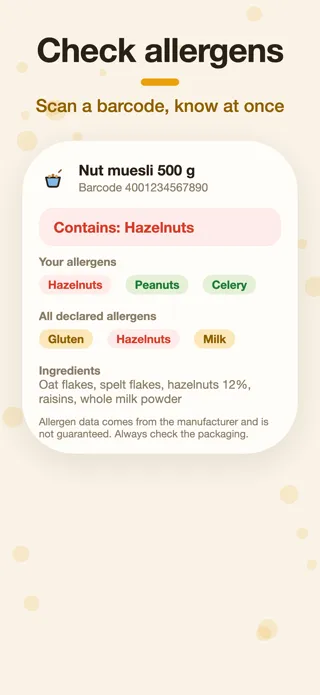
- Read: Coinchi takes over the number and shows ingredients, allergens and – if your household has bought the product before – the price of the last purchase.
What the browser scan does
The scan runs entirely in the browser. If the browser supports it, Coinchi uses its barcode detection (BarcodeDetector); otherwise a reader inside the web app does the job. You do not have to install another app.
What you see after the scan
After the scan you get ingredients, declared allergens and the Nutri-Score from public food databases such as Open Food Facts. On top of that come prices from the anonymised community receipts, so you can see what others paid for the same product. All details about the data sources and the allergen check are on scan product data.
On an iPhone: what makes the difference
An EAN code needs contrast. It works better under a bright lamp or in shade than in glaring light; the whole barcode should also be inside the frame. Shiny foil can usually be read at an angle. If a product is not found, you can photograph the ingredient list and add the data for everyone.
From a single code to the whole shopping list
A barcode answers the question about one product. For shopping you need more: with the shopping list with best price you see in which store your trolley costs the least overall, and you can photograph the receipt instead of scanning every product on its own. If you are sorting things out at home, the shopping list app to share helps – it runs on that same iPhone in the browser.
Frequently asked questions
Can I scan barcodes without an app?
Yes. Coinchi scans barcodes directly in the browser: open app.coinchi.co, allow camera access and hold the EAN code in the frame. A download from the App Store is not needed for that.
Does this work on an iPhone too?
Yes. On an iPhone, open the web app in the browser and allow camera access.
How does Coinchi read the code in the browser?
Depending on the browser, Coinchi uses the device's native barcode detection or a WebAssembly reader. The module it needs is delivered with the web app and is not loaded from a third-party CDN.
What do I see after the scan?
Ingredients, declared allergens and Nutri-Score from public food databases such as Open Food Facts, plus prices from the anonymised community receipts. The information on the packaging is always what counts.
Where do I start the barcode scan?
Open the Coinchi web app in the browser and choose the barcode scan.