
A shopping list app to share – for families, couples and flatmates.
With Coinchi you share shopping lists for free and without ads: invite someone to a list by email – view only or allowed to edit – or create a household and use all lists together. The app is available for Android on Google Play and in the browser, including on iPhone; the iOS app is in beta.

Free in your browser and as an Android app. The iOS app is in beta testing.

Two ways to share a list
Share a single list: tap Share on the list and enter the other person’s email address. You decide whether they can only view the list or edit it too. As soon as they accept the invitation in the app, they see the list.
Create a household: give it a name, for example “The Smiths”, and invite members by email or send them the join code via a messenger. In a household, all members see the lists and receipts of all members. If something should stay between two people, share a single list instead.
Who it suits
- Couples: whoever passes the shop ticks off what’s in the trolley.
- Families: one household with the roles admin, member and viewer.
- Flatmates: one shared list for cleaning supplies and staples, shared by email with everyone who should edit it.
Write faster, tick off reliably
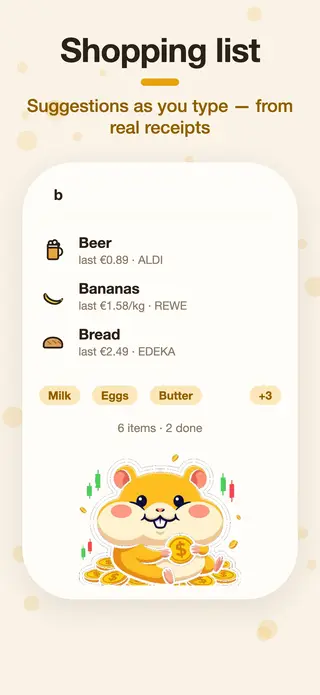
As you type, Coinchi suggests products from the shared catalogue. If an item is already on the list, the app tells you instead of adding it twice. Take a photo of a recipe and the ingredients land on the list. Ticking off works offline too; changes are sent as soon as you are back online.
More than a list: the cheapest shop
Coinchi works out which shop is cheapest for your list, with the distance and other branches of the same chain nearby. Prices come from your own receipts and from anonymous community receipts. How it works is explained on shopping list with best price. There is also a pantry with expiry dates, so you see what needs using up soon.
Android, iPhone, browser
Coinchi is available on Google Play. The iOS app is in beta; until then, on iPhone you use the web app at app.coinchi.co with the same features and the same account. The app is available in 57 languages. You sign in with Google or by email. As of November 2026.
Frequently asked questions
Is the shopping list app free?
Yes. Shopping lists, sharing, households, receipt scanning and price comparison are free, and Coinchi shows no ads. Only detailed statistics belong to Coinchi Premium, which is being prepared.
Can I share a list with someone who doesn’t use Coinchi?
No. The invited person needs a Coinchi account with that email address for the list to appear. Signing up is free.
Does the app work on Android and iPhone?
On Android via Google Play. On iPhone the web app runs in the browser; the iOS app is in beta.
What is the difference between a shared list and a household?
A shared list is seen only by the people you invite. In a household, all members see all lists and receipts of the other members.
Does ticking off work without internet?
Yes. Ticked-off items are sent as soon as there is a connection again.