
Grocery spending as a couple – tracked from your receipts.
Coinchi shows you what you spend on groceries each month: you photograph your receipts, the app reads items and totals, and in a shared household you see both partners’ receipts and the month’s total. It is free. Coinchi is not a budget book for all costs such as rent or insurance – it covers what is on your receipts.

Free in your browser and as an Android app. The iOS app is in beta testing.

How to set it up
- One of you creates a household in the app and sends the other the join code or an invitation by email.
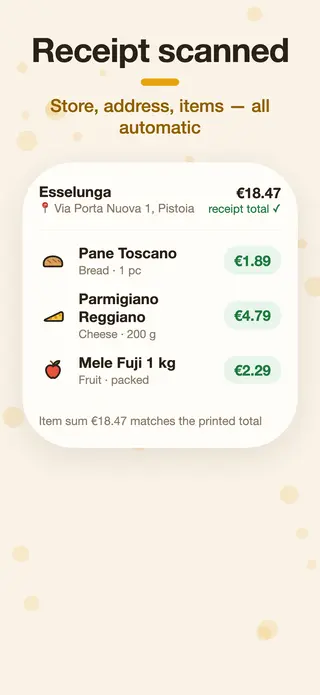
- You both photograph your receipts after shopping. Coinchi recognises shop, date, items and prices and checks the total.
- In the household you see both partners’ receipts. With the “Only me” view you look at just your own receipts.
What you see for free
The app’s home screen shows this month’s spending, the number of receipts and the savings from discounts printed on the receipts. Every receipt is stored with all its items, and you can view the photo at any time. For individual products Coinchi shows the price history, and a list names products that got more expensive in the last 30 days. Unusual prices on a receipt are flagged – handy when something was charged wrongly at the till.
Detailed statistics – spending over time, by shop and category, top products and VAT – belong to Coinchi Premium, which is being prepared.
Spend less, not just count
From your receipts and the anonymous community prices, Coinchi works out in which shop your shared shopping list is cheapest. How receipts are read is explained on scan receipts.
What Coinchi can’t do
- No spending without a receipt: rent, electricity or subscriptions aren’t entered here.
- No budget limit and no settling up of who owes whom.
- No export to Excel or CSV. You can download all your account data as a JSON file (data access request).
As of November 2026. Coinchi is available for Android on Google Play and in the browser at app.coinchi.co; the iOS app is in beta.
Frequently asked questions
Is the app free?
Yes. Receipt scanning, households, the monthly overview and price comparison are free and without ads. Detailed statistics belong to Coinchi Premium, which is being prepared.
Does my partner see all my receipts?
Yes. In a shared household, all members see the receipts of all members. If you want to keep your receipts to yourself, don’t join the household.
Can I export the spending to Excel?
No, there is no Excel or CSV export. You can download all your account data as a JSON file.
Can I add spending without a receipt?
No. Coinchi counts the shopping trips whose receipt you photograph.
What happens to the receipt photos?
For text recognition the photo is sent to an AI service provider. Receipt photos are deleted automatically after 30 days; the extracted data stays until you delete your account.